Scouting America

Art
Art
Merit Badge
Scouting America Merit Badge Hub

Art

Merit Badge Overview

This merit badge concentrates on two-dimensional art, specifically drawing and painting in various media, including an introduction to design applications in the fields of graphic arts and industrial design, history and design principles, and how these fields relate to fine art.
Art_merit-badge-overview

Art

Merit Badge Requirements

The previous version of the Merit Badge requirements can be found in Scoutbook

The requirements will be fed dynamically using the scout book integration
2. Discuss with your counselor the following terms and elements of art: line, value, shape, form, space, color, and texture. Show examples of each element.
Resource: Beginner's Guide to the 7 Elements of Art (video)
4. Render a subject of your choice in FOUR of these ways:
Resource: What Are the Different Mediums Used in Art? (video)
  • (a) Pen and ink
  • (b) Watercolors
  • (c) Pencil
  • (d) Pastels
  • (e) Oil paints
  • (f) Tempera
  • (g) Acrylics
  • (h) Charcoal
  • (i) Computer drawing or painting

1. Discuss the following with your counselor:
Resource: What Is Art (video)
6. With your parent or guardian's permission and your counselor's approval, visit a museum, art exhibit, art gallery, artists' co-op, or artist's workshop. Find out about the art displayed or created there. Discuss what you learned with your counselor.
Resources: Art Museums in the US (website)
Oahu's Art Scene: Museums, Murals, Makers and More (website)
  • (a) What art is and what some of the different forms of art are
  • (b) The importance of art to humankind
  • (c) What art means to you and how art can make you feel

3. Discuss with your counselor the six principles of design: rhythm, balance, proportion, variety, emphasis, and unity.
Resource: What Makes a Great Design? The 7 Principles You Need to Know (video)
  • (a) Design something useful. Make a sketch or model of your design. With your counselor's approval, create a promotional piece for the item using a picture or pictures.
  • (b) Tell a story with a picture or pictures or using a 3-D rendering.
  • (c) Design a logo. Share your design with your counselor and explain the significance of your logo. Then, with your parent or guardian's permission and your counselor's approval, put your logo on Scout equipment, furniture, ceramics, or fabric.

7. Find out about three career opportunities in art. Pick one and find out the education, training, and experience required for this profession. Discuss this with your counselor, and explain why this profession might interest you.
Resource: Careers in Art. The Amazing Jobs an Art Education Can Lead to! (video)
NOTE: The official merit badge pamphlets are now free and downloadable HERE or can be purchased at the Scout Shop.
fondo blanco liso
art_MB_pamphlet
divider-graphic

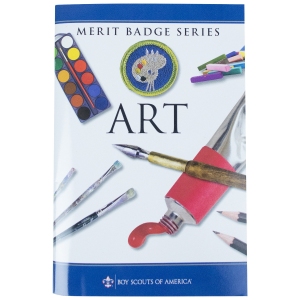
Get the Art Merit Badge Pamphlet

Merit Badge Pamphlets are now free and publicly available. Note: Always check stg.scouting.org/skills/merit-badges/all/ for the latest requirements.

Discover more about

"Art"

logo-scoutlife-2
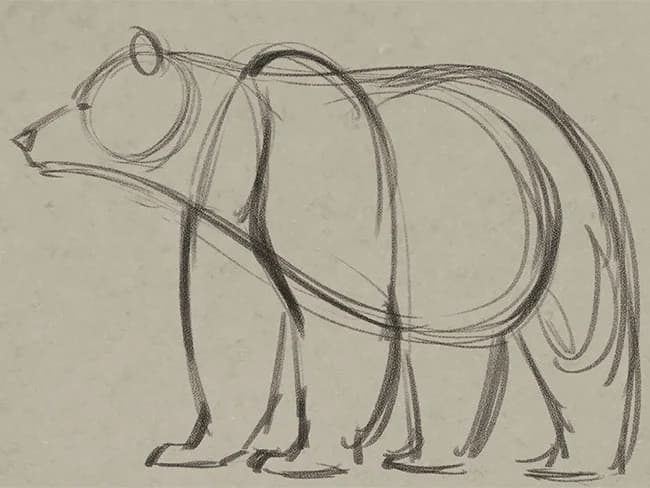
Bears are fun to draw. Watch this video to find out how to draw one with this art lesson from Aaron Blaise, an Oscar-nominated animator who worked on The Lion King, Aladdin, Brother Bear and more. HOW TO DRAW A BASIC BEAR IN 5 STEPS Here’s a step-by-step guide for drawing a basic bear. beardraw-1 1. Start by lightly sketching the rough form of a grizzly bear on toned paper. Notice how the head and neck flows right into the body. The shoulders and legs can be added next. beardraw-2 2. Using your rough sketch as a guide, start to add the details such as facial features and fur textures. beardraw-3 3. Finish out the detail. Be sure to make your bear nice and shaggy. beardraw-4 4. Now you’re ready to add some color. Start with the base color of the bear. beardraw-5 5. Finish it all off by adding some deeper shadows and highlights. This stage really enhances the fur texture and gets your bear to “pop” right off the page! HOW TO DRAW A BEAR HEAD When drawing the head of a bear, start with drawing a sphere. Then attach a simplified snout to it. Keeping the approach simple like this will enable you to draw a bear’s head from any angle. HOW TO DRAW FUR ON YOUR BEAR DRAWING Creating the illusion of fur is really about knowing where to add some scruffiness rather than drawing thousands of individual hairs all over your drawing. The drawing on the right consists of only smooth lines. By adding a few scruffy spots in select areas, you can make your bear look furry. Look for areas where the line direction changes. At these areas, add some scruff. Also, on a grizzly, the underside of the bear tends to be scruffier than the top. HOW TO DRAW A STANDING BEAR 1. Start simply. Draw a circle for the head and a “wire frame” for the body. Be sure to find the “flow” of the pose. 2. Now start to rough in the body by drawing the major masses: head, trunk and hind legs. 3. Using your rough drawing as a guide, start to loosely sketch the rest of the anatomy. 4. Lightly erase your drawing at this point. Then start to draw in the details and fur texture. Notice the fur is broken up into clumps. 5. Now add some color. Start with the base color of your bear. Be sure to leave the snout light. 6. The final step is adding shadows, highlights and fur texture. Toned paper lets you add highlights with a light-colored pencil, pen or pastel. You can also erase to create light areas. Shadows can be added with dark pencil or charcoal. HOW TO DRAW A WALKING BEAR Now that you can draw a bear, here’s how to put it into motion. HOW TO DRAW A RUNNING BEAR CUB In four-legged locomotion, the faster an animal moves, the fewer feet it will have on the ground at any given time. Notice in the walk above that three feet are almost always on the ground, while in the run shown here, there are never more than two feet on the ground at any given time.

In Partnership with

View Related Merit Badges

Chat Icon
Scoutly Toggle Size Close Chat
New Digital Resource Guides Available

Digital resource guides for Fingerprinting & Cycling are now available. Check them out today!